безплатна доставка
на поръчки над 50 EUR




| Гаранция | 24 месеца |
| Брой дискове | 2 бр. |
| Максимален капацитет (общо) | до 36 TB |
| Интерфейс | SATA III |
| Екстри | 2x USB 3.2 Gen1, 1x 1GbЕ LAN |


 0% лихва за 6 месеца


Процесор: Realtek RTD1619B 4-core 1.7GHz
Капацитет: 1 GB DDR4
Брой хард дискове: 2 (не са включени)
Съвместими устройства:
Операции RAID:
Портове:
Мрежа: 1 x RJ-45 1GbE
Размери: 232,7 x 108 x 165 мм
Включени Хард Дискове: Не
Networking protocols: SMB1 (CIFS), SMB2, SMB3, NFSv3, NFSv4, NFSv4.1, NFS Kerberized sessions, iSCSI, HTTP, HTTPs, FTP, SNMP, LDAP, CalDAV
Охлаждане: 1 х 92x92 mm
File sharing: SMB/AFP/NFS/FTP/WebDAV
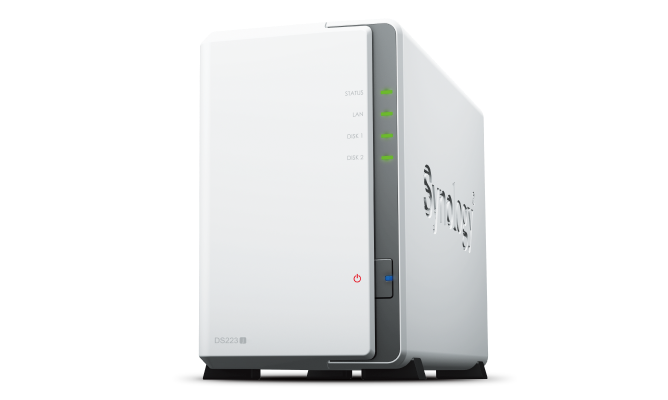
DiskStation DS223jCompact, quiet, and energy-efficient storage |
 |
 |
 |
 |
Secure private cloudAnywhere, anytime secure access to all your data. |
Easy sharing and syncingSafely access and share files and media from anywhere. |
Comprehensive data protectionHardware and software engineered to protect your data — trusted by millions. |
DS223j is designed for small teams to share, sync, and collaborate more efficiently.
Manage your files and media from anywhere with Synology Drive. Available on PC, Mac, Linux, Chromebook, Android, iOS, or any device equipped with a browser.
Stay productive while working in a team or with your clients. Work together across different platforms using Synology Office.
Keeping data synced between different sites has never been easier. Synology Drive ShareSync keeps files and folders synchronized across Synology systems.
Sync files between your private cloud and public cloud storage platforms, including Google Drive, Dropbox, Microsoft OneDrive, and more with Synology Cloud Sync. Retain local copies of your cloud data to centralize management and achieve data ownership.
Your data in safe hands with BtrfsThe advanced Btrfs file system helps safeguard data against corruption through file self-healing and allows for the reversal of unintentional or malicious changes through fast snapshot technology. |
Configure your DS223j to manage all your documents, photos, and other files, or protect your physical assets with professional video surveillance.
Organize your photos and videos with smart and intuitive features. Browse automatically generated albums using facial recognition, geolocation, tags, and more.
Securely share media with colleagues or clients while leveraging privacy-focused options for your peace of mind. Collaborate with selected users on a folder-based media library by creating a Shared Space.
Automatically upload photos and videos taken on your mobile device to your private cloud with Synology Photos or Synology Drive.
Leverage Synology Drive to protect data from ransomware attacks or accidental deletion with real-time or scheduled backup of your PC folders.
Choose from over 8,300 IP cameras or ONVIF devices compatible with Synology Surveillance Station to keep your premises secure.
Watch live camera streams through web browsers, desktop clients, or mobile apps. Get notified of events and take immediate action.
Back up your entire Synology device, including system settings and applications, or select specific folders. Transfer all backup data to multiple destinations using Hyper Backup.
Take your data protection to the next level by creating automatic point-in-time snapshots of shared folders that can be copied off-site and rapidly restored using Snapshot Replication.
| CPU Model | Realtek RTD1619B |
| CPU Quantity | 1 |
| CPU Architecture | 64-bit |
| CPU Frequency | 4-core 1.7 GHz |
| Hardware Encryption Engine |  |
| System Memory | 1 GB DDR4 non-ECC |
| Notes | Synology reserves the right to replace memory modules with the same or higher frequency based on supplier's product life cycle status. Rest assured that the compatibility and stability have been strictly verified with the same benchmark to ensure identical performance. |
| Drive Bays | 2 |
| Compatible Drive Type* (See all supported drives) |
|
| Hot Swappable Drive* | - |
| Notes | "Compatible drive type" indicates drives that have been tested to be compatible with Synology products. This term does not indicate the maximum connection speed of each drive bay. |
| RJ-45 1GbE LAN Port | 1 |
| USB 3.2 Gen 1 Port* | 2 |
| Notes |
|
| Internal Drives |
|
| External Drives |
|
| Notes | Btrfs file system is available from DSM 7.2-64570. |
| Size (Height x Width x Depth) | 165 mm x 100 mm x 225.5 mm |
| Weight | 0.88 kg |
| System Fan | 92 mm x 92 mm x 1 pcs |
| Fan Speed Mode |
|
| Brightness Adjustable Front LED Indicators | |
| Power Recovery | |
| Noise Level* | 18.2 dB(A) |
| Scheduled Power On / Off | |
| Wake on LAN / WAN | |
| Power Supply Unit / Adapter | 60 W |
| AC Input Power Voltage | 100V to 240V AC |
| Power Frequency | 50/60 Hz, Single Phase |
| Power Consumption | 16.31 W (Access) 4 W (HDD Hibernation) |
| British Thermal Unit | 55.62 BTU/hr (Access) 13.64 BTU/hr (HDD Hibernation) |
| Notes |
|
| Operating Temperature | 0°C to 40°C (32°F to 104°F) |
| Storage Temperature | -20°C to 60°C (-5°F to 140°F) |
| Relative Humidity | 5% to 95% RH |
| Certification |
|
| Warranty |
2-year hardware warranty, extendable to 4 years with Extended Warranty Plus
|
| Environment | RoHS Compliant |
| Packaging Content |
|
| Maximum Single Volume Size* | 108 TB |
| Maximum Internal Volume Number | 64 |
| SSD TRIM | |
| Supported RAID Type |
|
| RAID Migration | Basic to RAID 1 |
| Volume Expansion with Larger HDDs |
|
| Volume Expansion by Adding a HDD | Synology Hybrid RAID |
| Notes |
|
| File Protocol | SMB/AFP/NFS/FTP/WebDAV |
| Maximum Concurrent SMB/AFP/FTP Connections | 100 |
| Windows Access Control List (ACL) Integration | |
| NFS Kerberos Authentication | |
| Notes | The testing standard was based on the maximum number of concurrent connections supported by this model. During the testing, 25% of the connections were used to transfer files concurrently. The transfer process guaranteed that the connections were not interrupted; the minimum transfer speed was not guaranteed. |
| Maximum Local User Accounts | 1,024 |
| Maximum Local Groups | 256 |
| Maximum Shared Folder | 256 |
| Maximum Shared Folder Sync Tasks | 4 |
| Data & Folder Backup | |
| Syslog Events per Second | 200 |
| Networking Protocols | SMB1 (CIFS), SMB2, SMB3, NFSv3, NFSv4, NFSv4.1, NFS Kerberized sessions, iSCSI, HTTP, HTTPs, FTP, SNMP, LDAP, CalDAV |
| Supported Browsers |
|
| Supported Language | English, Deutsch, Français, Italiano, Español, Dansk, Norsk, Svenska, Nederlands, Русский, Polski, Magyar, Português do Brasil, Português Europeu, Türkçe, Český, ภาษาไทย, 日本語, 한국어, 繁體中文, 简体中文 |
| Notes | For an updated list of supported browser versions, check the DSM Technical Specifications. |
| Synology Chat | |
| Maximum Concurrent Download Tasks | 80 |
| Maximum iSCSI Target Number | 10 |
| Maximum LUN | 10 |
| LUN Clone/Snapshot, Windows ODX | |
| DLNA Compliance | |
| Facial Recognition | |
| Maximum Snapshots per Shared Folder | 256 |
| Maximum of System Snapshots | 4,096 |
| Notes | Snapshot Replication is available from DSM 7.2-64570. |
| Maximum IP cam | 12 (including 2 Free License) |
| Total FPS (H.264) | 360 FPS @ 720p (1280x720) 360 FPS @ 1080p (1920x1080) 300 FPS @ 3M (2048x1536) 150 FPS @ 5M (2591x1944) 110 FPS @ 4K (3840x2160) |
| Total FPS (H.265) | 360 FPS @ 720p (1280x720) 360 FPS @ 1080p (1920x1080) 360 FPS @ 3M (2048x1536) 350 FPS @ 5M (2591x1944) 200 FPS @ 4K (3840x2160) |
| Notes |
|
| Recommended Number of Concurrent Sync Clients | 200 (the number of connections that can be maintained when the recommended number of hosted files was reached) |
| Recommended Number of Hosted Files | 500,000 (applies to files indexed or hosted by Synology Drive. For file access through other standard protocols, refer to the File Services section above) |
| Notes |
|
| Maximum Users | 200 |
| Notes |
|
| Video Station | |
| Maximum Connections | 10 |




Работно време по празниците: 09:30-18:00 на 29.12-30.12
Неработни дни: 31.12.2025 г. -07.01.2026 г.
Всички поръчки пуснати на 29.12 и 30.12 ще започнат да се обработват на 08.01.2026 г.
Плащането с банкова карта НЯМА да бъде възможно в периода 31.12 - 06.01.2026 г.
Екипът на Gplay.bg Ви желае весели празници!


